Free photo editor
A full Photoshop-style photo editor in your browser: layers, masks, adjustment layers, filters, brushes, text and real PSD files. It runs on your own computer, so your photos are never uploaded. Free, no signup, no watermark.
Opens full screen in a new tab. The first visit downloads about 13 MB, then your browser keeps a copy. Works in current Chrome, Edge, Firefox and Safari on a computer.
📱 On a phone? This editor is built for a mouse and a big screen. For quick edits on your phone, use the simple image editor instead.
Click inside the editor before using keyboard shortcuts. Open full screen ↗
How to use the photo editor
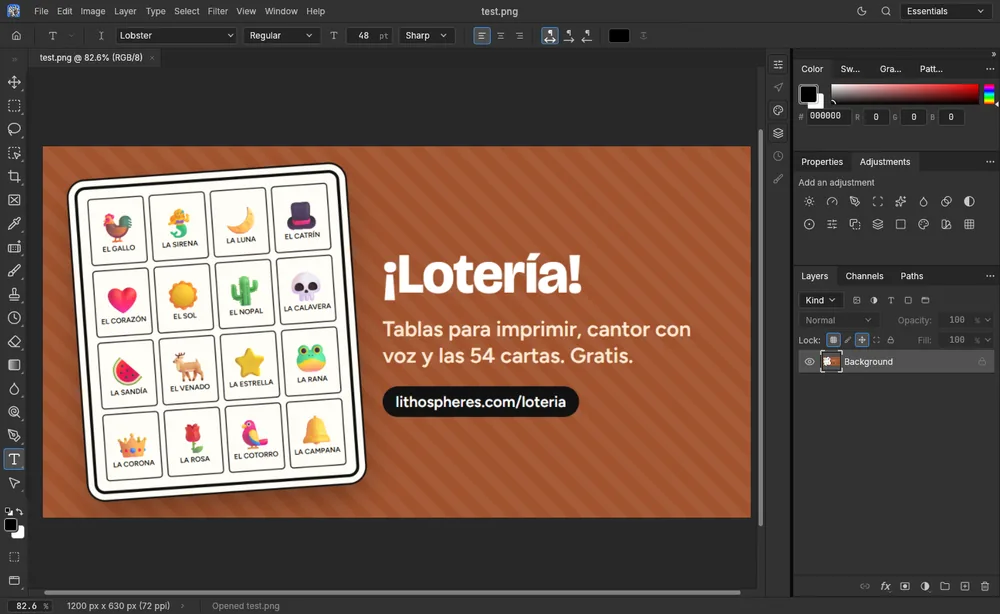
This is PhotoCraft, a free, open-source editor that copies the layout of Photoshop: tools down the left, settings for the current tool across the top, and the Color, Properties, Adjustments and Layers panels on the right. If you have used Photoshop, most menus and shortcuts are where you expect them.
Edit a photo in four steps
- Click Open the photo editor, then Open… (Ctrl+O) and pick a photo. You can also drag a photo onto the editor. For a blank canvas, click New document… (Ctrl+N).
- Pick a tool on the left, such as the brush, the crop tool or the type tool (press T). Its settings appear in the bar along the top.
- For color and light, use the Adjustments panel on the right or Layer › New Adjustment Layer. Adjustment layers keep your original pixels untouched, so you can change or delete them later.
- When you're done, use File › Export › Quick Export as PNG for a finished picture, or File › Export › Export As… to choose JPG, PNG or WebP, the quality and the size. To keep your layers for later, use File › Save. Both download the file to your computer.
What it can do
- Layers: groups, layer masks and vector masks, clipping masks, blend modes, opacity, fill layers and smart objects.
- Adjustments: Levels, Curves, Hue/Saturation, Vibrance, Black & White, Channel Mixer, Gradient Map, Photo Filter, Selective Color and more, either as editable layers or applied straight to the pixels.
- Selections: marquees, lassos, Magic Wand, Quick Selection, Object Selection and Select Subject, plus Select and Mask for soft edges like hair. The smart selection runs on your computer too.
- Retouching: Spot Healing Brush, Healing Brush, Patch, Clone Stamp, Red Eye, Dodge, Burn and Sponge.
- Filters: Gaussian, Motion and Lens Blur, Tilt-Shift, sharpening, Reduce Noise, distortions such as Twirl, Wave and Ripple, Oil Paint, Lens Flare and more, with a live preview on the canvas.
- Text and shapes: point and paragraph text that stays editable, layer styles such as Drop Shadow, Stroke and Outer Glow, and the Pen and shape tools.
- Files: opens PSD and PSB, TIFF, PNG, JPG, WebP, GIF, BMP and more, plus GIMP, Krita and Paint.NET files. Saves layered PSD files.
Fonts
Besides its own two fonts, Inter and JetBrains Mono, this copy of the editor includes 15 free Google Fonts for the type tool: Anton, Bebas Neue, Caveat, Dancing Script, Lato, Lobster, Montserrat, Open Sans, Oswald, Pacifico, Permanent Marker, Playfair Display, Poppins, Raleway and Roboto. Each font downloads the first time you pick it. A browser can't use the fonts installed on your computer, so a PSD that uses other fonts shows a stand-in font until you change it.
Handy shortcuts
| Keys | What they do |
|---|---|
| Ctrl+O / Ctrl+N | Open a file / start a new document |
| Ctrl+Z / Ctrl+Shift+Z | Undo / redo |
| Ctrl+T | Free Transform: scale, rotate or skew a layer |
| Ctrl+J | Copy the current layer, or the selection, to a new layer |
| Ctrl+I | Invert colors |
| Ctrl+G | Group the selected layers |
| Ctrl+F | Search every command by name |
| Ctrl+S / Ctrl+Shift+S | Save / Save As (downloads the file) |
On a Mac, use Cmd in place of Ctrl. If you forget where something is, Ctrl+F finds any command by name.
Save often
The browser version has no autosave. If you close the tab, reload the page or your browser crashes, unsaved work is gone. Save a PSD every so often while you work on anything you care about. A PSD keeps your layers, so you can open it again here later, or in Photoshop, GIMP or Krita.
Good to know
- It's a young project. PhotoCraft is new and moves fast, so you may find a feature that is missing or rough. For a quick crop, resize or collage, the simple image editor, image resizer and background remover are faster.
- Big files need memory. Very large photos or PSDs with many layers use a lot of your computer's memory. If the editor slows down, close other tabs.
- Graphics trouble? The editor draws with your graphics card. If the canvas looks wrong, open the editor in compatibility mode.
PhotoCraft is open-source software by the ArtCraft team and community, released under the MIT and Apache 2.0 licenses (source code on GitHub, notices). Lithospheres hosts the official release with extra fonts added. Adobe and Photoshop are trademarks of Adobe Inc.; neither PhotoCraft nor Lithospheres is affiliated with Adobe.
FAQ
Are my photos uploaded to a server?
No. The whole editor downloads to your browser and runs on your own computer. Opening a photo reads it from your device, and saving or exporting downloads the file back to your device. Nothing is sent to Lithospheres or anyone else.
Can it open and save Photoshop PSD files?
Yes. It opens layered PSD and PSB files, keeps their layers, masks, type and layer styles editable, and saves them back as PSD. A few rarely used Photoshop features may not be supported yet, so keep a copy of the original file.
Will I lose my work if I close the tab?
Yes. The browser version has no autosave or crash recovery. Use File, Save to download a PSD that keeps your layers, or File, Export to download a PNG or JPG, before you close or reload the page.
Does it work on a phone?
It loads, but the desktop-style panels are too small to use comfortably on a phone screen. Use a computer, or a tablet in landscape. On a phone, the simpler Lithospheres image editor works better.
Why does it take a moment to open the first time?
The editor is about 13 MB, so the first visit downloads it. Your browser then keeps a copy, so later visits open much faster.
Is this Adobe Photoshop?
No. It is PhotoCraft, a free, open-source editor made by the ArtCraft team that works the way Photoshop users expect. It is not made by, affiliated with or endorsed by Adobe.